

Workload Identity Federation
Use Workload Identity Federation (WIF) with OIDC to let CI/CD workloads authenticate to Bright without storing a Bright project API key. The workload presents an OIDC ID token from its CI/CD provider. Bright validates the token against the project WIF configuration and returns a temporary Bright access token.
Bright WIF and AWS Bedrock IAM are separateThis page configures authentication from CI/CD to the Bright API and produces a temporary value for
BRIGHT_TOKEN. It does not configure inference access to AWS Bedrock.To run STAR with Bedrock without a static
INFERENCE_TOKEN, see AWS Bedrock Authentication with IAM and OIDC. You can use both federation flows in the same CI/CD job.
Use WIF for automation that can request OIDC ID tokens. Use a regular project API key for clients that cannot request OIDC ID tokens.
How it works
- Create a WIF configuration in the Bright project.
- Configure the CI/CD job to request an OIDC ID token.
- Send an RFC 8693 token exchange request to Bright. Bright accepts JSON and
application/x-www-form-urlencodedrequests.
POST /api/v1/token
Content-Type: application/json{
"grant_type": "urn:ietf:params:oauth:grant-type:token-exchange",
"subject_token": "<oidc-id-token>",
"subject_token_type": "urn:ietf:params:oauth:token-type:id_token",
"resource": "https://app.brightsec.com/api/v1/projects/{projectId}"
}- Bright validates the token issuer, audience, expiry, optional
resource, and claim policy. - Bright returns
200 OKwithaccess_tokenin a response body. - Use
access_tokenas a Bright API key for API calls. - Revoke the Bright access token per RFC 7009 when the job no longer needs it.
POST /api/v1/revoke
Content-Type: application/json{
"token": "<bright-access-token>",
"token_type_hint": "access_token"
}The resource field is optional. Use it when the same OIDC token could match WIF configurations in more than one Bright project.
The examples below use Acme sample values. Replace every sample value with values from your own CI/CD provider and Bright project.
Step 1: Create the WIF configuration in Bright
- In Bright, go to Projects and open the project.
- Select Settings > Federated Credentials. This page lists the project's federated credentials and contains the WIF configuration for OIDC-issued tokens.
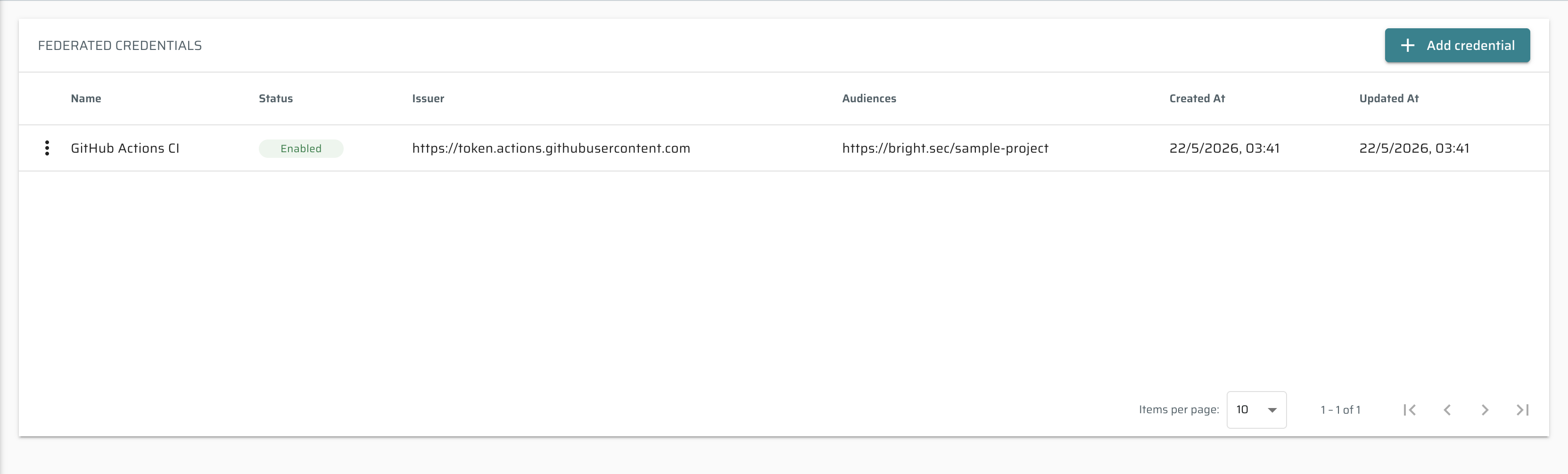
- Click Add credential.
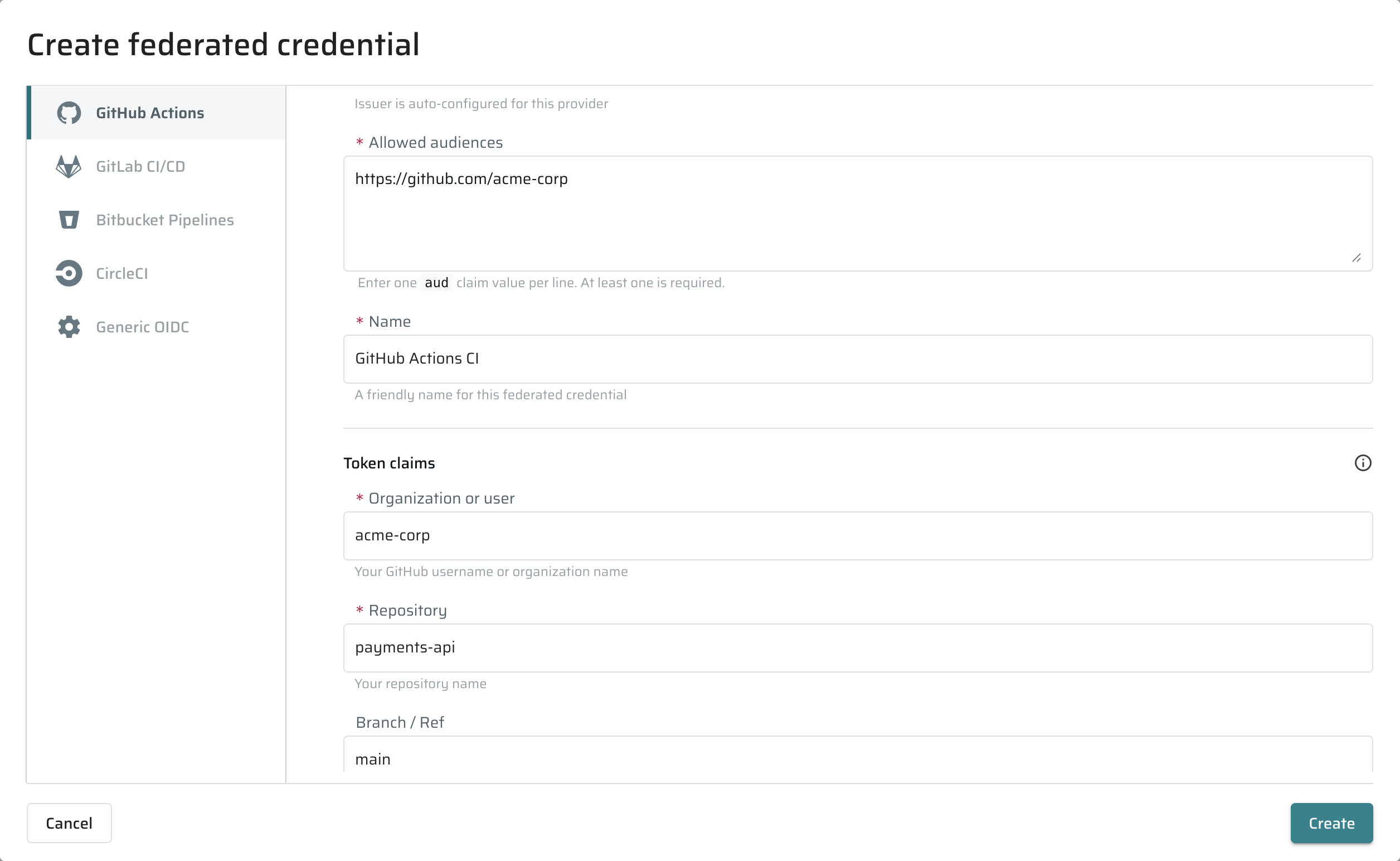
- Select the CI/CD provider.
- Fill the Name, Allowed audiences, and provider-specific token claim fields.
- Click Create.
Use the row actions menu in the table to Disable (pause without deleting), Enable, or Remove an existing federated credential.
A project can hold up to 20 federated credentials. Remove unused credentials before adding new ones if you hit the limit.
Make sure every federated credential uniquely identifies one workload across all Bright projects. Constrain provider claims (for example, repository, branch, environment, or pipeline) tightly enough that only the intended workload matches.
If two credentials across different Bright projects could still accept the same token, the workload must include the
resourceparameter in the token-exchange request pointing to the exact target project. Ambiguous exchanges withoutresourceare rejected.
Step 2: Configure the CI/CD provider
Use the section for your provider. Each provider example shows the Bright fields and the smallest CI/CD change needed to make an OIDC ID token available as OIDC_TOKEN.
GitHub Actions
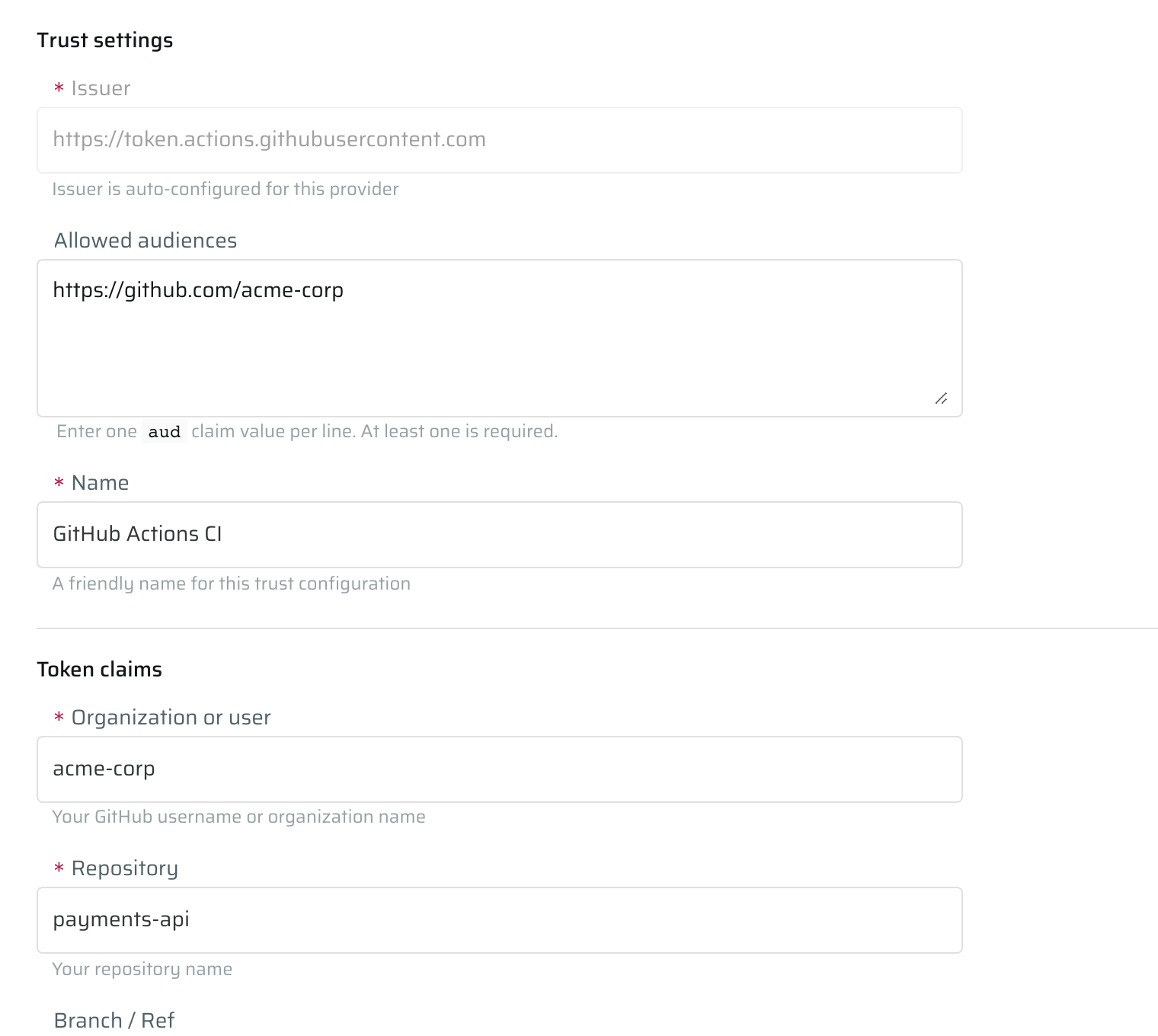
Configure these Bright fields:
| Bright field | Description |
|---|---|
| Issuer | GitHub OIDC issuer: https://token.actions.githubusercontent.com. |
| Allowed audiences | Audience requested by the workflow, for example https://github.com/acme-corp. |
| Organization or user | GitHub owner of the repository. |
| Repository | Repository name. |
| Branch / Ref | Allowed branch, tag, or ref, for example main. |
| Environment name | Optional GitHub Actions environment name. |
Add id-token: write to the workflow and request the token in the job:
permissions:
id-token: write
contents: read
steps:
- name: Request GitHub OIDC token
run: |
OIDC_TOKEN=$(curl -sS \
-H "Authorization: Bearer ${ACTIONS_ID_TOKEN_REQUEST_TOKEN}" \
"${ACTIONS_ID_TOKEN_REQUEST_URL}" | jq -r '.value')This example uses GitHub's default audience (i.e. https://github.com/<org-or-user-name>). To use a custom audience, append &audience=<value> to ACTIONS_ID_TOKEN_REQUEST_URL and enter the same value in Allowed audiences.
GitLab CI/CD
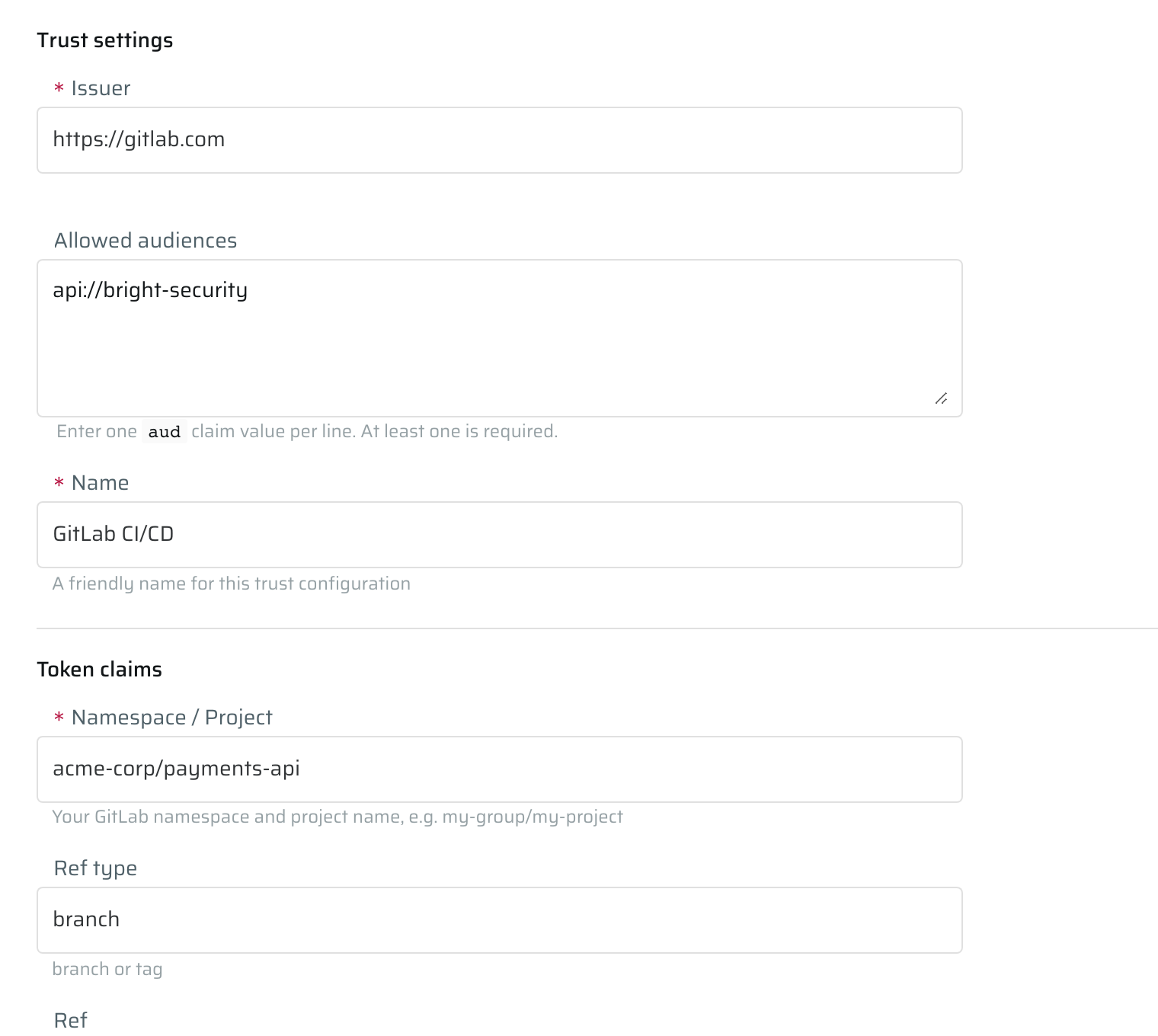
Configure these Bright fields:
| Bright field | Description |
|---|---|
| Issuer | GitLab OIDC issuer, for example https://gitlab.com. |
| Allowed audiences | Audience set in the job's id_tokens block. |
| Namespace / Project | Full GitLab project path, for example acme-corp/payments-api. |
| Ref type | Allowed ref type, such as branch or tag. |
| Ref | Allowed branch or tag, for example main. |
Request an ID token in the GitLab job:
deploy:
id_tokens:
BRIGHT_OIDC_TOKEN:
aud: api://bright-security
script:
- OIDC_TOKEN="$BRIGHT_OIDC_TOKEN"The aud value in .gitlab-ci.yml must match one value in Allowed audiences.
Bitbucket Pipelines
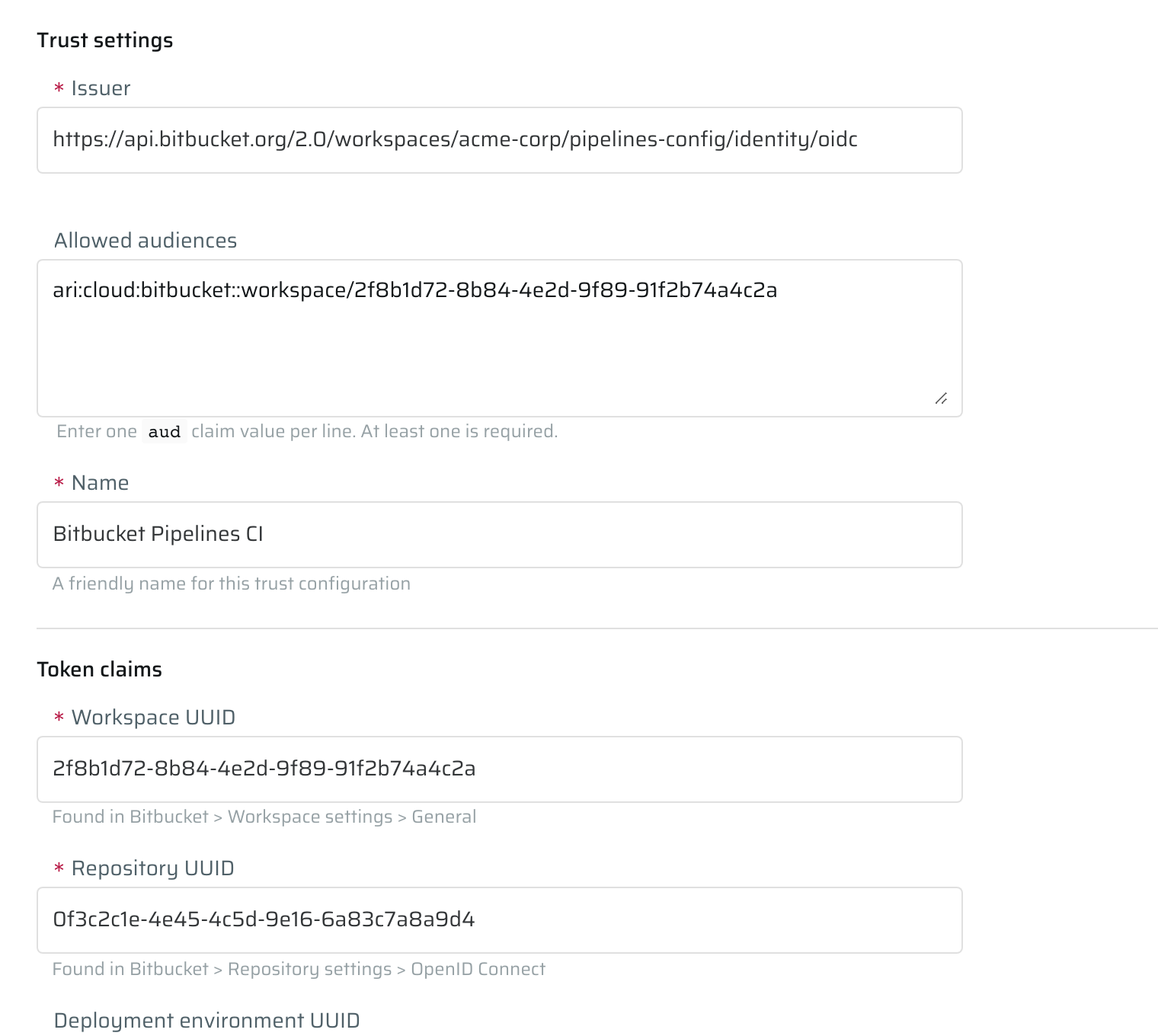
Configure these Bright fields:
| Bright field | Description |
|---|---|
| Issuer | Bitbucket workspace OIDC issuer. |
| Allowed audiences | Bitbucket workspace audience, usually the workspace ARI. |
| Workspace UUID | Bitbucket workspace UUID. |
| Repository UUID | Bitbucket repository UUID. |
| Deployment environment UUID | Optional deployment environment UUID. |
Enable OIDC in the pipeline step:
pipelines:
default:
- step:
oidc: true
script:
- OIDC_TOKEN="$BITBUCKET_STEP_OIDC_TOKEN"Copy the issuer, audience, workspace UUID, and repository UUID from Bitbucket repository settings.
CircleCI
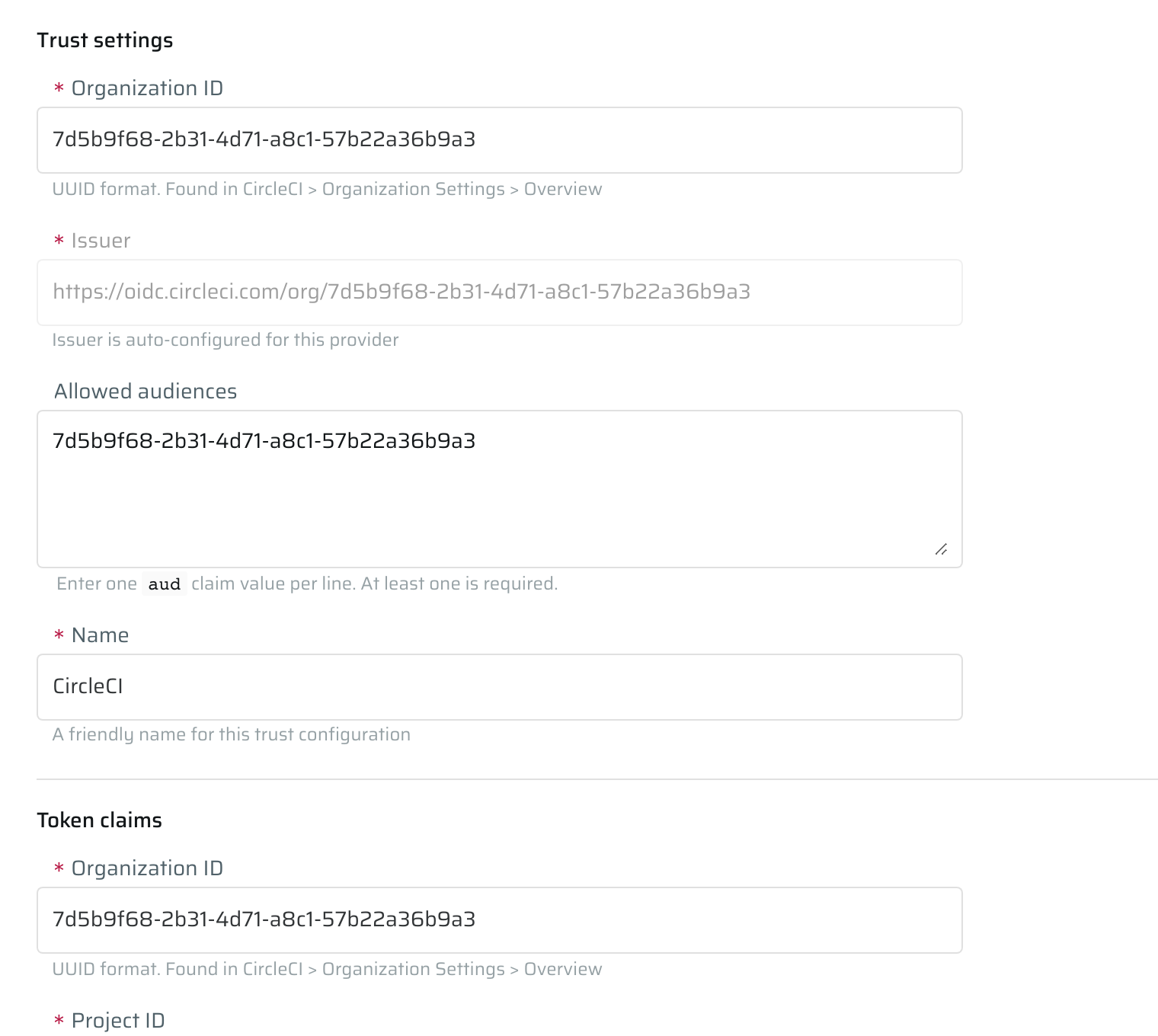
Configure these Bright fields:
| Bright field | Description |
|---|---|
| Organization ID | CircleCI organization UUID. |
| Issuer | CircleCI organization issuer, for example https://oidc.circleci.com/org/<organization-id>. |
| Allowed audiences | Usually the CircleCI organization ID. |
| Project ID | CircleCI project UUID. |
| VCS origin | Optional repository origin, for example github.com/acme-corp/payments-api. |
| VCS ref | Optional branch or tag ref, for example refs/heads/main. |
Use CircleCI's OIDC token in the job:
jobs:
bright:
docker:
- image: cimg/base:stable
steps:
- checkout
- run: |
OIDC_TOKEN="$CIRCLE_OIDC_TOKEN_V2"Use $CIRCLE_OIDC_TOKEN_V2 when the WIF configuration checks VCS origin or VCS ref.
Custom OIDC
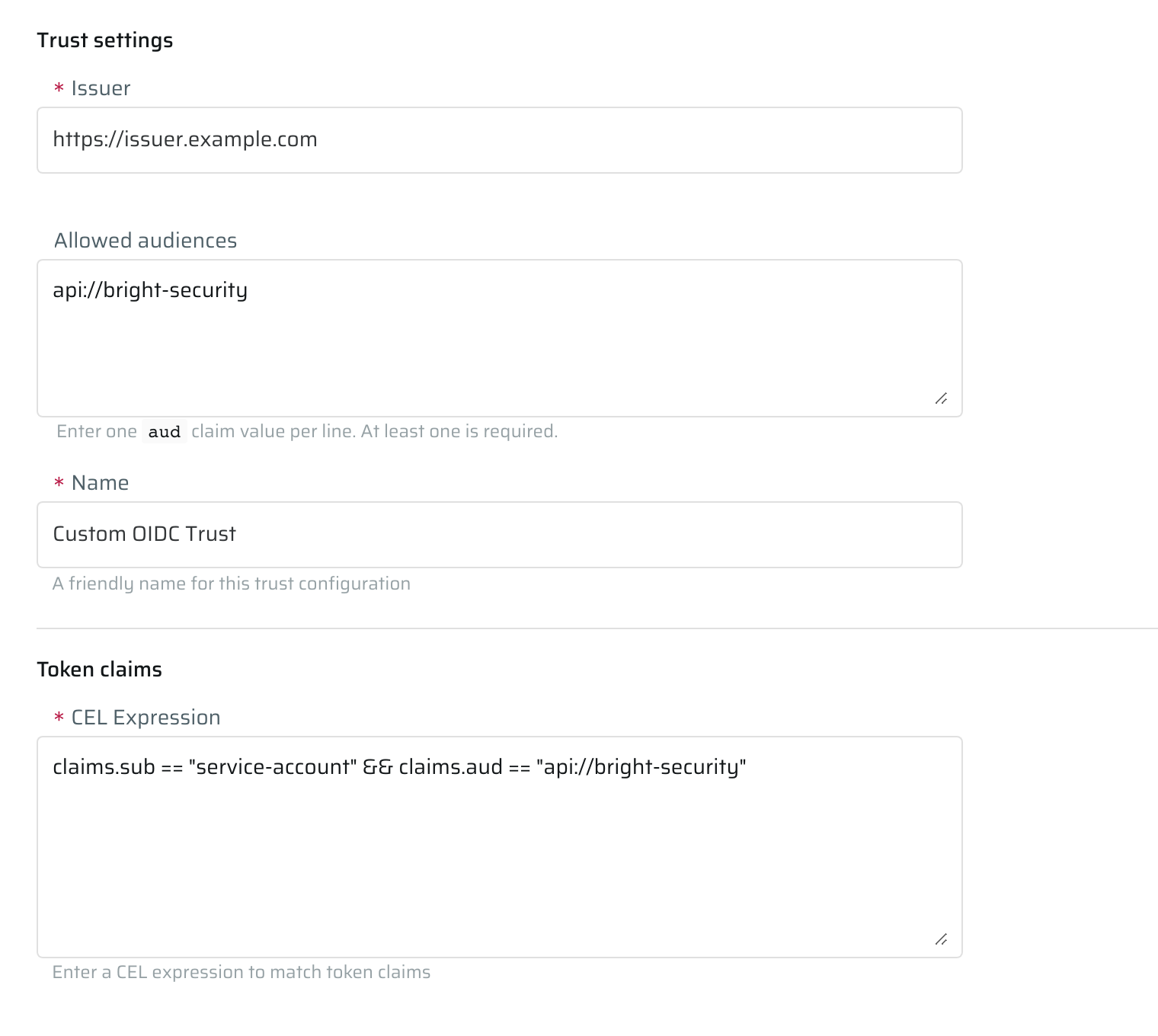
Configure these Bright fields:
| Bright field | Description |
|---|---|
| Issuer | OIDC issuer URL. |
| Allowed audiences | Accepted token audience. |
| CEL Expression | CEL expression matched against token claims. |
Supported CEL policy syntax
Bright uses CEL expressions as claim policies for Custom OIDC claim checks and supports only the subset below. See the CEL language specification for the base language.
| Item | Supported syntax |
|---|---|
| Inputs | sub, iss, aud, and claims |
| Nested claims | Dot notation, for example claims.pipeline.id |
| Operators | &&, ==, and in |
| Function | startsWith() with a non-empty string literal |
| Literal values | Strings, booleans, integers, floats, and literal lists |
Every expression must return a boolean and include a non-empty subject constraint: sub == "...", sub.startsWith("..."), or sub in ["...", "..."].
Unsupported syntax includes ||, !, !=, arithmetic operators, regex or matches functions, contains functions, bracket access, comprehensions, macros, and custom functions.
Make the CEL policy expression specific to the exact workflow, repository, branch, tag, environment, project, or deployment context that should receive Bright access. Broad policy expressions can grant access to unrelated workloads that share the same issuer and audience.
Examples:
sub == "installation_id:12345"
sub.startsWith("repo:acme/web:") && claims.environment == "production"
sub in ["repo:acme/web", "repo:acme/api"] && claims.pipeline.id in [1001, 1002]
sub == "job:deploy" && claims.pipeline.protected == true && claims.score == 0.95Request a token from your identity provider and assign it to OIDC_TOKEN:
OIDC_TOKEN="$(your-provider command that prints an OIDC ID token)"Decode a sample token from a non-production run before saving the WIF configuration. Use exact claim names from the token payload in the CEL expression.
Step 3: Exchange the OIDC ID token for a Bright access token
After the provider step sets OIDC_TOKEN, exchange it with Bright in the same job:
set -euo pipefail
exchange_payload=$(jq -n \
--arg token "${OIDC_TOKEN}" \
--arg resource "${BRIGHT_BASE_URL}/api/v1/projects/${BRIGHT_PROJECT_ID}" \
'{
grant_type: "urn:ietf:params:oauth:grant-type:token-exchange",
subject_token: $token,
subject_token_type: "urn:ietf:params:oauth:token-type:id_token",
resource: $resource
}')
exchange_response=$(curl -sS --fail-with-body \
-X POST "${BRIGHT_BASE_URL}/api/v1/token" \
-H 'Content-Type: application/json' \
--data "${exchange_payload}")
BRIGHT_TOKEN=$(jq -r '.access_token // empty' <<< "${exchange_response}")
if [[ -z "${BRIGHT_TOKEN}" ]]; then
echo "OIDC exchange response did not include access_token." >&2
exit 1
fiSet BRIGHT_BASE_URL to your Bright URL, for example https://app.brightsec.com. Set BRIGHT_PROJECT_ID to the project ID that contains the WIF configuration. The resource field is optional, but it is recommended when the OIDC token could match WIF configurations in more than one Bright project.
Use BRIGHT_TOKEN as an API key in Bright API requests: Authorization: Api-Key ${BRIGHT_TOKEN}.
When using MCP, the same token may be provided as a bearer token instead:
Authorization: Bearer ${BRIGHT_TOKEN}
Step 4: Revoke the Bright access token
Revoke the temporary Bright token after the job finishes or when the job no longer needs Bright access:
revoke_payload=$(jq -n \
--arg token "${BRIGHT_TOKEN}" \
'{ token: $token, token_type_hint: "access_token" }')
curl -sS --fail-with-body \
-X POST "${BRIGHT_BASE_URL}/api/v1/revoke" \
-H 'Content-Type: application/json' \
--data "${revoke_payload}"Do not print
OIDC_TOKENorBRIGHT_TOKENto CI/CD logs.
Security recommendations
- Restrict claim conditions to the specific repository and branch, tag, environment, project, or deployment environment that should authenticate.
- Use a Bright-specific audience when the provider lets you choose the audience.
- Request the OIDC token inside the job that needs it. Do not store OIDC tokens as CI/CD secrets.
- Revoke the temporary Bright access token with
POST /api/v1/revokewhen the job no longer needs it. - Remove static project API keys that the OIDC flow replaces.
- Disable or remove the WIF configuration when the CI/CD workflow no longer needs Bright project access.
Troubleshooting
Bright does not find a matching WIF configuration
Decode the OIDC ID token payload and compare the actual claims with the Bright project settings:
issmust match the configured issuer exactly.- At least one
audvalue must match an allowed audience. - Provider-specific fields or the Custom OIDC CEL policy must match the token claims.
Use the exact claim names and values from the token payload. Do not rely on provider UI labels when writing a CEL policy.
These checks apply to the OIDC ID token issued by the CI/CD provider.
Common provider checks:
- GitHub Actions: workflow includes
id-token: write. - GitLab CI/CD: job uses
id_tokens, andaudmatches Bright. - Bitbucket Pipelines: step includes
oidc: true. - CircleCI: job uses
$CIRCLE_OIDC_TOKEN_V2when matching VCS origin or VCS ref.
The same token can match more than one project
Pass resource in the token exchange request:
{
"resource": "https://app.brightsec.com/api/v1/projects/{projectId}"
}Also narrow the WIF configuration. Match a specific repository, branch, tag, environment, deployment context, pipeline ID, or other stable claim that identifies the intended workload.
The Bright token should no longer be usable
Call POST /api/v1/revoke with the Bright access_token returned by /token:
{
  "token": "<bright-access-token>",
  "token_type_hint": "access_token"
}Revocation applies to the temporary Bright access token only. It does not revoke the OIDC ID token issued by the CI/CD provider.
Learn more
- GitHub Actions OpenID Connect
- GitLab CI/CD OIDC for cloud services
- Bitbucket Pipelines OpenID Connect
- CircleCI OpenID Connect tokens
Updated 2 months ago