

Repeater Runtime Indicators
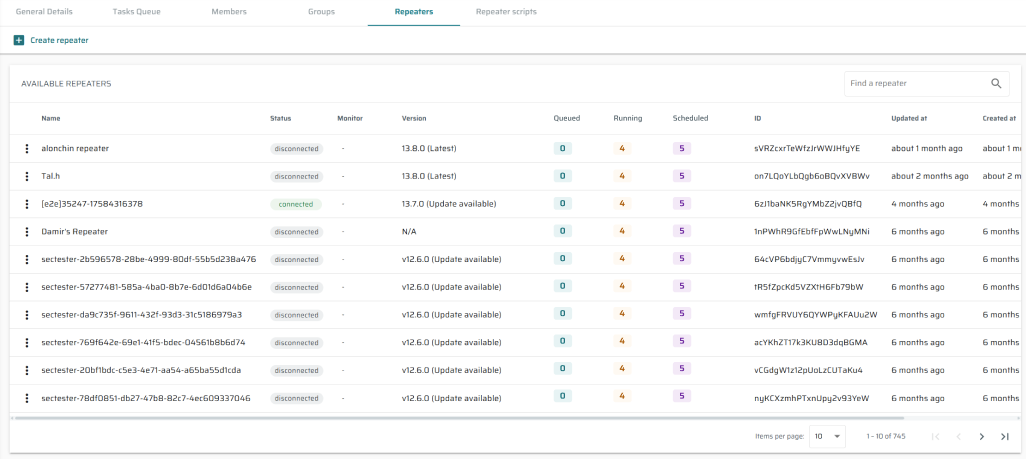
The Repeater Runtime Indicators provide visibility into the current workload and connectivity of your repeaters.
They help you understand how busy each repeater is and whether it is available, so you can make better decisions when selecting a repeater for scans, discovery, or authentication.
Where You Can See It
The runtime indicators appear in:
- Settings -> Repeaters settings page (V1)
Repeater selector (Scan / Discovery / Authentication) (V2 - Coming soon)
What the Indicators Show
Each repeater displays real-time execution status:
Queued- number of tasks waiting to run
Running- number of tasks currently executing
Scheduled- number of upcoming tasks
These indicators reflect the current workload on the repeater.
Connectivity Status
Each repeater also shows its connection state:
- Connected - repeater is active and available
- Disconnected - repeater is not reachable
If connectivity data is not available, the system will show:
- Unknown status
How to Use It
Use the indicators to:
- Choose a repeater with a lower load
- Avoid overloaded repeaters
- Identify repeaters that are not connected
- Balance execution across multiple repeaters
Tooltips
Hover over the indicators to see more details about:
- Number of executions
- Discoveries
- Scans
Notes
- Data is updated in near real-time
- Indicators are for visibility only and do not change system behavior
- No additional configuration is required
Updated 6 months ago