

WIZ
The Bright - Wiz integration sends Bright DAST vulnerability findings to Wiz so they can be correlated with assets and other security signals in Wiz. Once configured, Bright periodically uploads findings data to Wiz using Wiz’s External Data Ingestion API.
Prerequisites
Before configuring the integration, make sure you have:
- A Bright account with integration permissions
- Refer to Wiz Documentation for Wiz side configuration
Configure the Integration in Bright
- Log in to Bright.
- Navigate to the “Organization Settings” page
- Click the “Integrations” tab
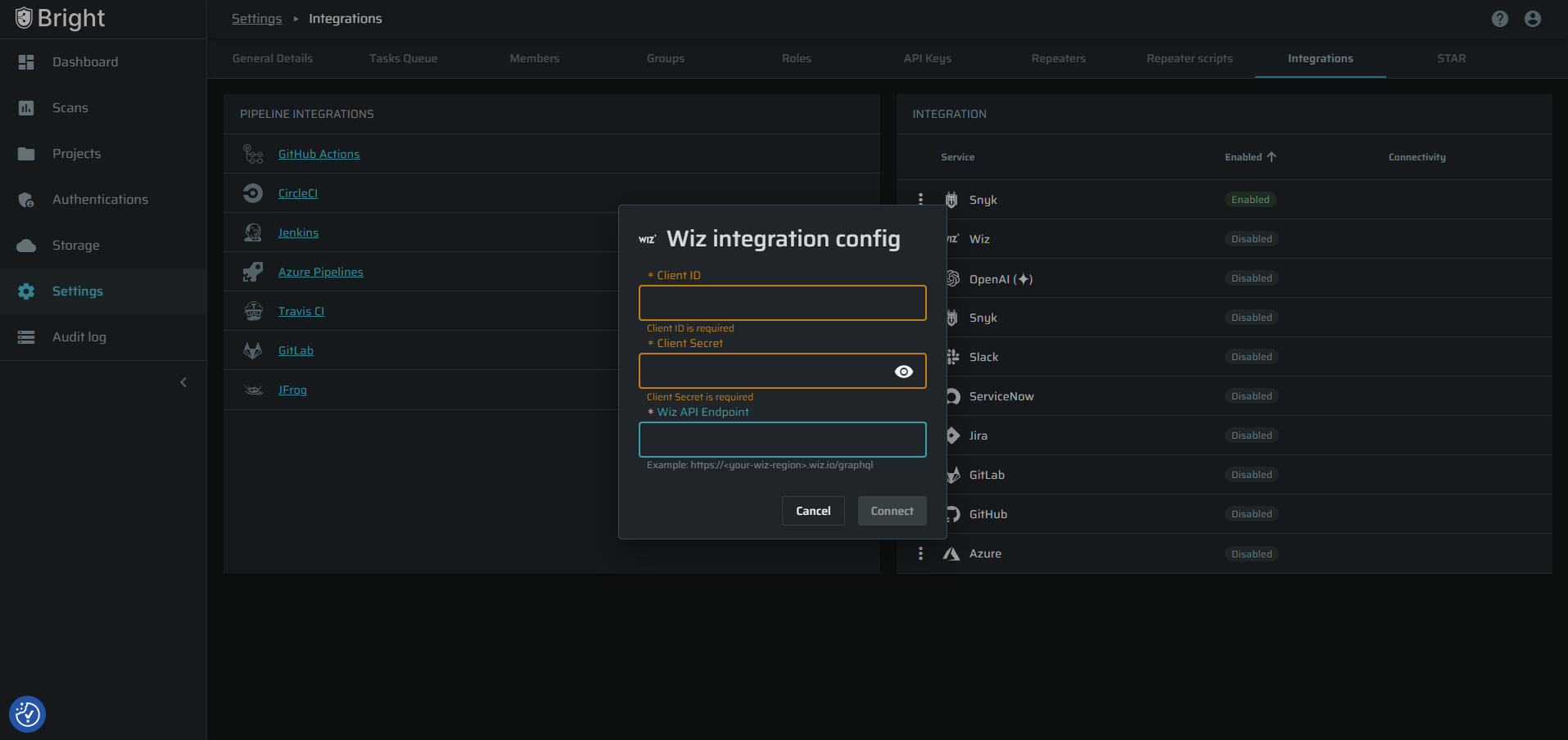
- In the “Integration” widget, click the 3-dots button for the Wiz integration
- Select the “Settings” menu item
- FIll in:
- Client ID
- Client Secret
- Wiz API Endpoint input fields
- Click “Connect” button
If the credentials are valid, Bright will confirm that the connection was successfully established.
The integration is now configured across the organization
How the Integration Works
- After setup, Bright automatically sends vulnerability findings to Wiz.
- Bright prepares a report containing the vulnerabilities detected during scans.
- This report is automatically uploaded to Wiz as a daily snapshot of all vulnerabilities within all projects in the org.
- Wiz analyzes the data and associates the findings with the relevant cloud asset.
- The vulnerability will appear in the Wiz dashboard as a security issue.
Vulnerability Lifecycle
The integration also updates vulnerability status automatically.
Example Workflow
- Bright detects a SQL Injection vulnerability
- The finding is sent to Wiz
- Wiz displays the vulnerability as Open
Later:
- The developer fixes the issue
- A new Bright scan runs
- The vulnerability is no longer detected
- Bright sends a new report
- Wiz marks the vulnerability as Resolved
This ensures vulnerability status stays synchronized between the platforms.
Data Sync Behavior
- Bright sends one daily snapshot of findings
- Only new or recurring vulnerabilities are included
- This prevents exceeding Wiz ingestion limits
- Wiz may take up to 24 hours to process the data after it is received.
Troubleshooting
If the integration does not work:
- Make sure the following values are correct:
- Client ID
- Client Secret
- API Endpoint
- Check Permissions
- Check permissions settings in the Wiz application
- Check Scan Activity
- The integration only sends data after scans are executed. If no scans run, no data will appear in Wiz.
Updated 7 months ago
Did this page help you?