

Configure OTP Entry Across Multiple Input Fields
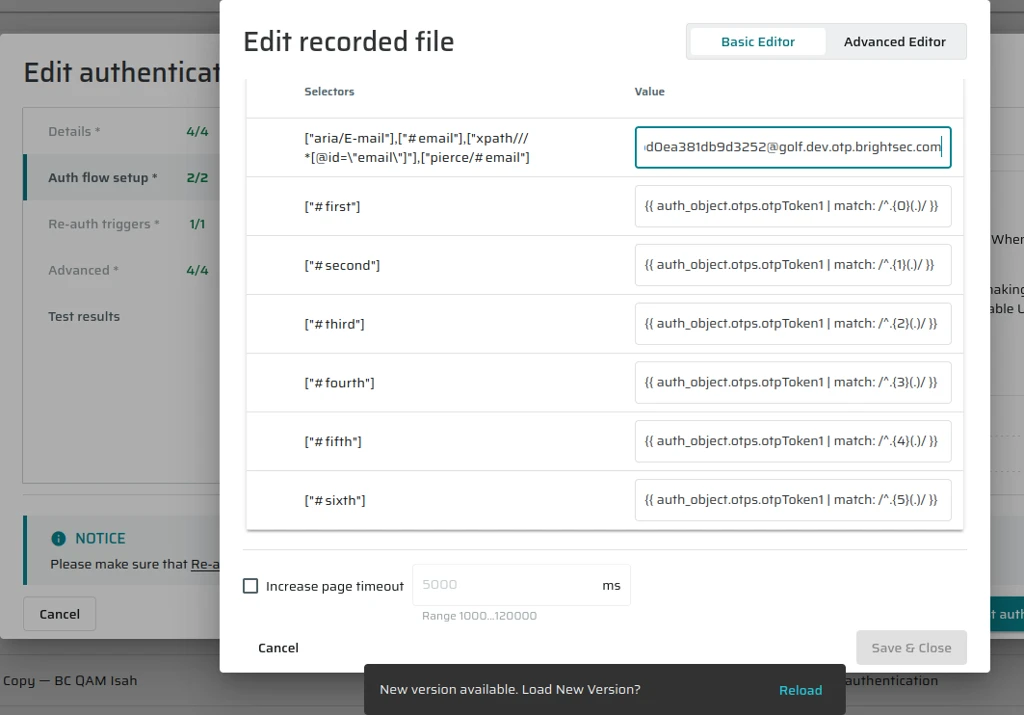
Some applications require One-Time Passwords (OTP) to be entered one digit per input field, using multiple separate input elements.
Previously, Bright could only inject the full OTP value into a single field, which blocked MFA authentication for applications using this common OTP UX pattern.
This feature enables extracting individual digits from an OTP and inserting each digit into a separate input field, allowing successful MFA authentication flows.
When should I use this?
- Use this capability when:
- The target application displays multiple OTP input fields (for example, 6 separate fields)
- Each input field accepts a single digit only
- You are configuring an Authentication Object (AO) that uses MFA
Syntax
To extract a specific digit from an OTP, use the following template syntax:
{{ auth_object.otps.token1 | match: /^.{N}(.)/ : 1 }}
Parameters
- token1 – the OTP token
- N – the zero-based index of the digit to extract
- match – applies a regular expression to the OTP value
- (.) – captures a single character (digit)
- : 1 – returns the first captured group
Example – 6-digit OTP
For an OTP value like 839421, map each digit to a separate input field as follows:
{{ auth_object.otps.token1 | match: /^.{0}(.)/ : 1 }} > 8
{{ auth_object.otps.token1 | match: /^.{1}(.)/ : 1 }} > 3
{{ auth_object.otps.token1 | match: /^.{2}(.)/ : 1 }} > 9
{{ auth_object.otps.token1 | match: /^.{3}(.)/ : 1 }} > 4
{{ auth_object.otps.token1 | match: /^.{4}(.)/ : 1 }} > 2
{{ auth_object.otps.token1 | match: /^.{5}(.)/ : 1 }} > 1
Updated 9 months ago