

Release of July 28, 2026
What's new
This release makes authentication setup faster and easier. Bright can now suggest Protected Resources and authentication triggers from recorded traffic, reducing manual configuration. Users can also assign an Authentication Object to multiple Entry Points at once.
The Organization Dashboard now shows the Top 5 Vulnerability Types, helping users quickly understand their most common security risks and open the related issues.
Bright Agent also adds support for more AI coding tools, including Cursor, Google Antigravity, Claude Code, Codex, and GitHub Copilot, making Bright security capabilities easier to access during development.
Automatic Protected Resource and Trigger Detection
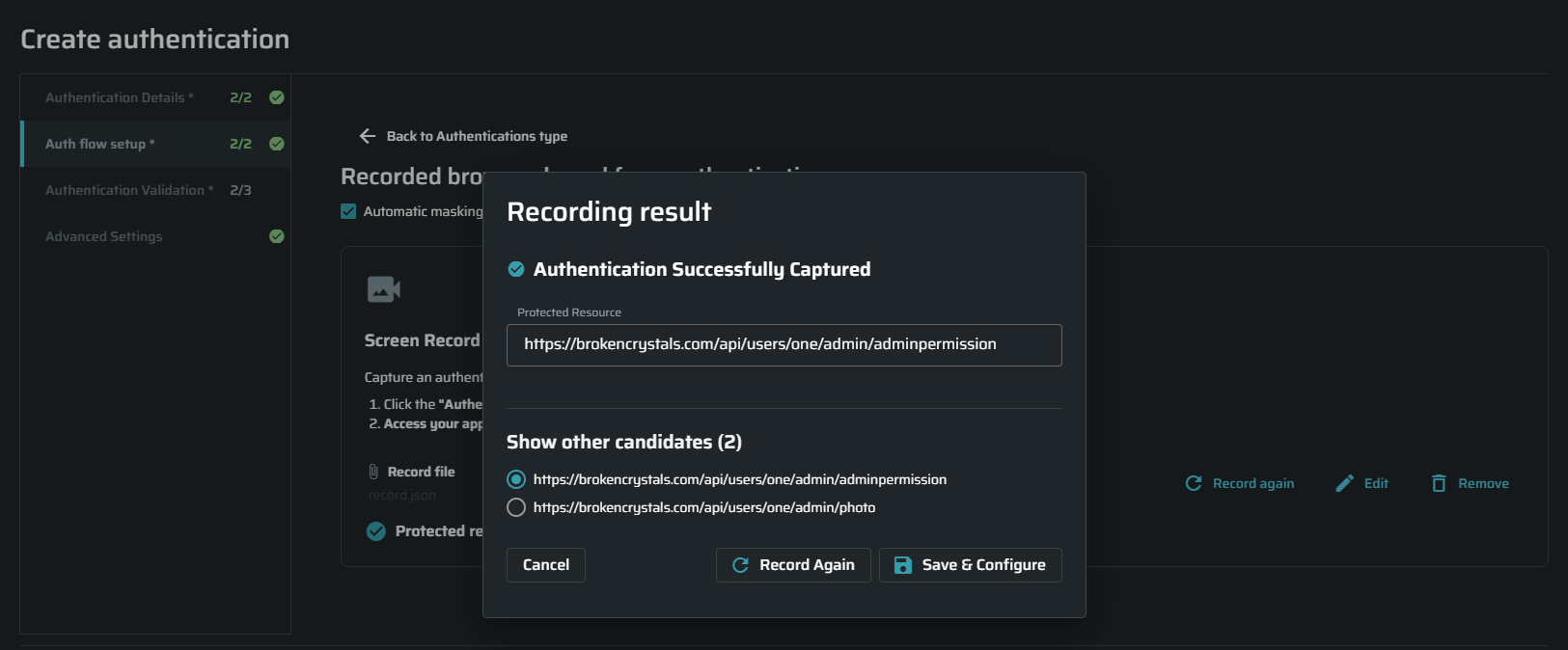
Bright can now suggest a Protected Resource after you record an authentication flow.
Bright analyzes the recorded flow and suggests the page or API endpoint that shows a successful login. You can confirm the suggestion, choose another detected option, or enter the Protected Resource manually.
To use this feature, select the Auto Protected Resource checkbox.
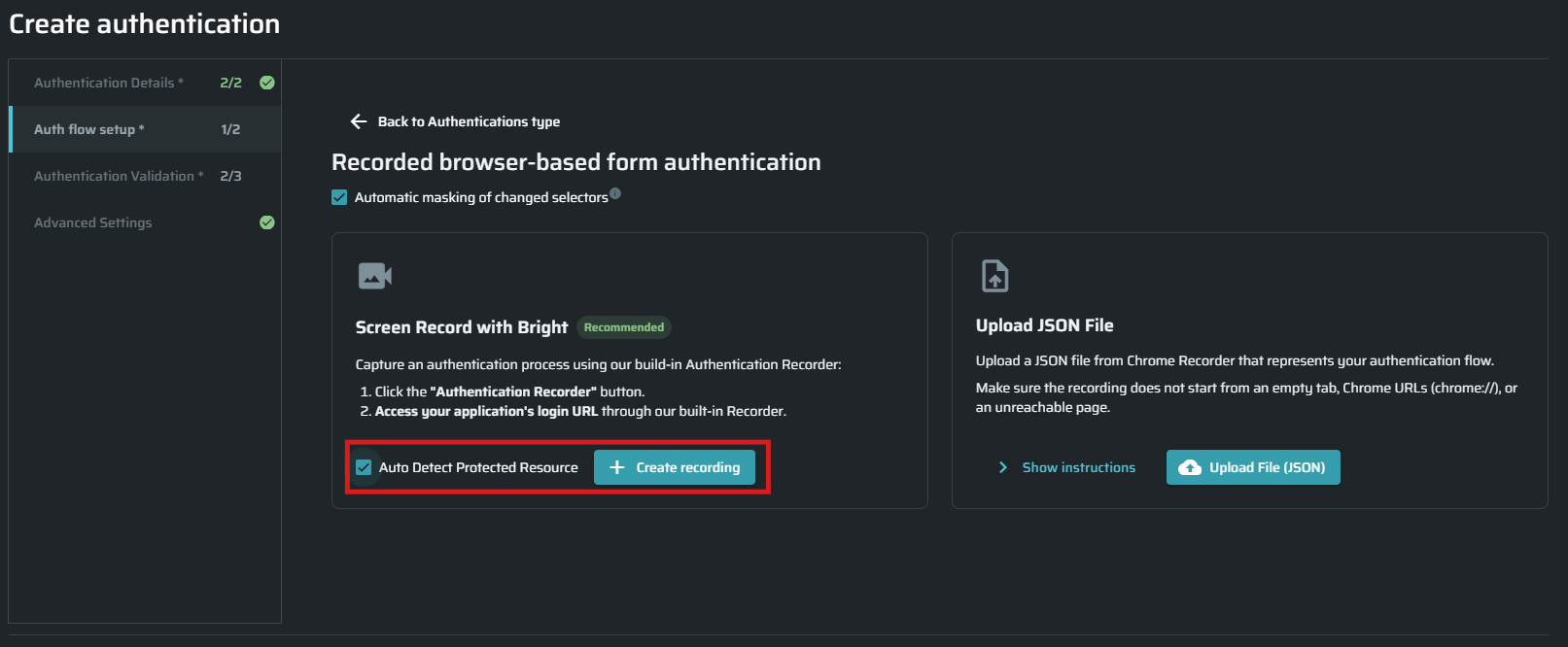
Bright can also detect possible authentication triggers from the same recorded traffic.
It currently supports:
- Response status triggers, such as 401 or 403
- Redirect triggers based on a 302 response with a Location header
When a trigger is detected, Bright automatically fills in the relevant fields. You can review, edit, remove, or keep the suggested values before saving.
These improvements reduce manual setup and make authentication configuration faster and easier, while also preventing configuration mistakes.
Top 5 Issue Types
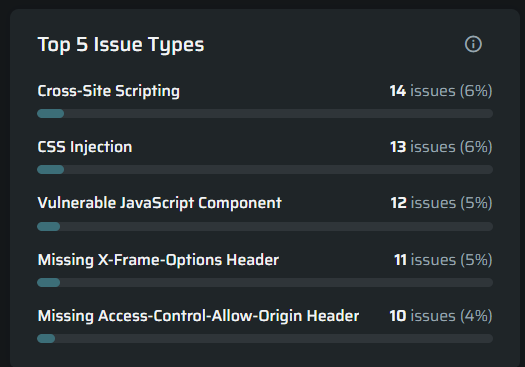
The Organization Dashboard now shows the five most common Issue types across your projects.
The widget displays the number and percentage of issues for each issue type. Select an issue type to see the affected projects. Then, select a project to open its Issues page, filtered by that issue type.
This helps you quickly understand your main security risks and decide where to focus.
Bulk Authentication Assignment for Entry Points
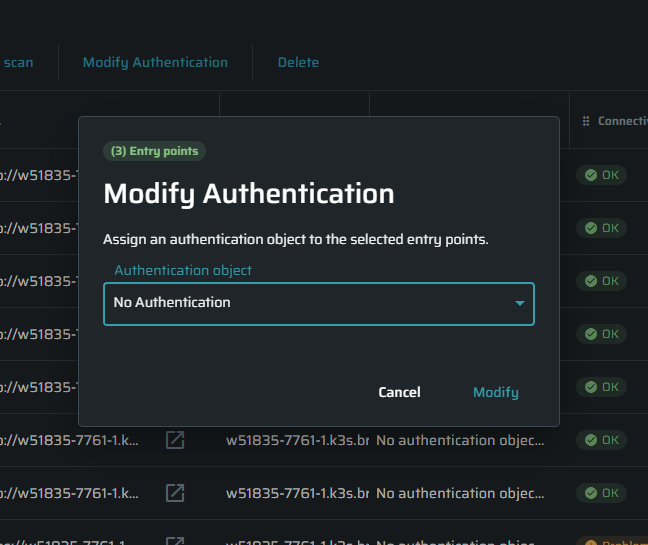
You can now assign an Authentication Object to multiple Entry Points at once.
Select the relevant Entry Points, choose Assign Authentication, and select an Authentication Object from the current project. You can also remove an existing assignment.
This makes it faster to update authentication settings without running a Discovery.
New Tests
- MCP Session Management — new coverage for MCP servers:
- Predictable Session ID — detects weak or guessable MCP session identifiers
- Session Used as Authentication — detects servers accepting a session ID as auth
- Session Not Invalidated After Logout — detects sessions that stay valid after logout
Improvements
- SQL Injection — more reliable time-based detection with faster, more consistent scan times.
- Cross-Site Scripting (XSS) — now detects XSS inside XML attribute contexts. We also improved stability and performance, which allows for faster, more consistent scan times.
- Secret Tokens — extended to detect leaked Anthropic, OpenAI, and Google Gemini API keys.
- Full Path Disclosure — broader detection with an added CRLF/header-injection payload shape, plus baseline-aware active checks that distinguish paths newly disclosed by the test from those already present in the crawled response.
- CSS Injection — improved accuracy when the browser navigates away from the entry point during testing.
- MCP ID Enumeration — sharper targeting on JSON-RPC endpoints by skipping the protocol-level
idfield.
Bright <> Xygeni Integration
Bright now integrates with Xygeni, allowing validated DAST findings to be imported into the Xygeni platform for enhanced vulnerability prioritization and correlation with additional security insights.
For setup instructions, see the Xygeni integration documentation.
Updated SAML SSO Documentation
We have updated and expanded our SAML SSO documentation with clearer setup instructions for supported Identity Providers.
The updated guide includes configuration steps, required values, user provisioning details, login instructions, and troubleshooting tips.
For more information, visit the SAML SSO configuration guide and Okta SSO and Provisioning.