

Release of September 22, 2026
Bright Optimizer
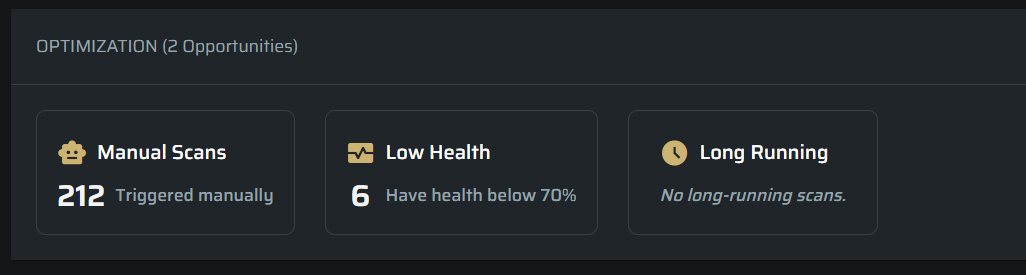
Added a new optimization experience that helps users identify areas where their Scans can be improved within a project.
The Optimizer highlights:
- Scans that are still triggered manually and could be automated.
- Scans with low health scores.
- Long running Scans
Users can select an insight to open a filtered list of the affected Scans. This reduces the time needed to manually review execution data and identify automation, configuration, and reliability issues.
Each optimization also includes guidance that explains the issue and recommends how to address it, providing a clearer and faster troubleshooting experience.
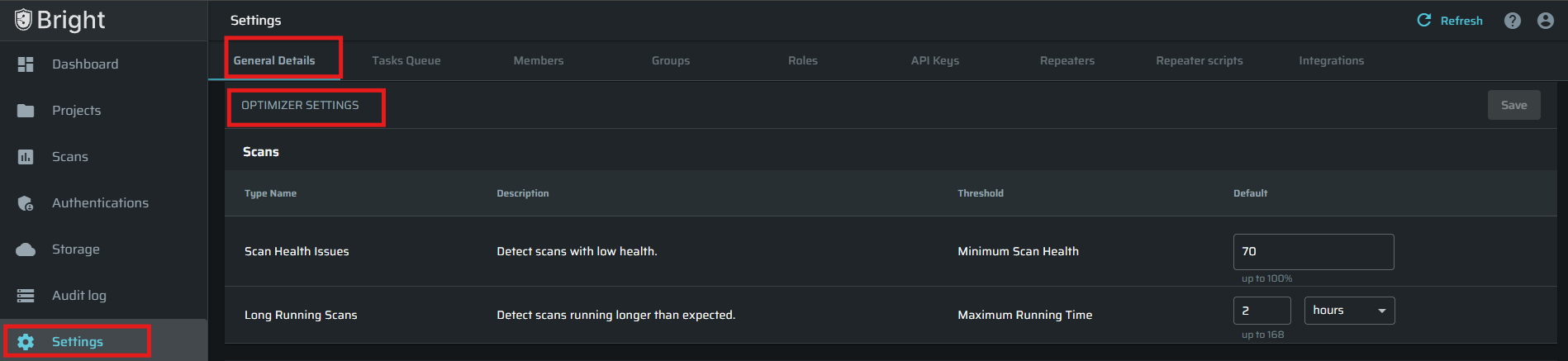
Users can also configure the alert thresholds to match their organization’s requirements and avoid unnecessary noise. Via Organization Settings -> General Details -> Optimizer Settings
A new Project Dashboard widget shows the total number of optimization opportunities within the project, helping users quickly understand when improvements are available.
For more info, visit the Bright Optimzier documentation.
Task Overview Widgets
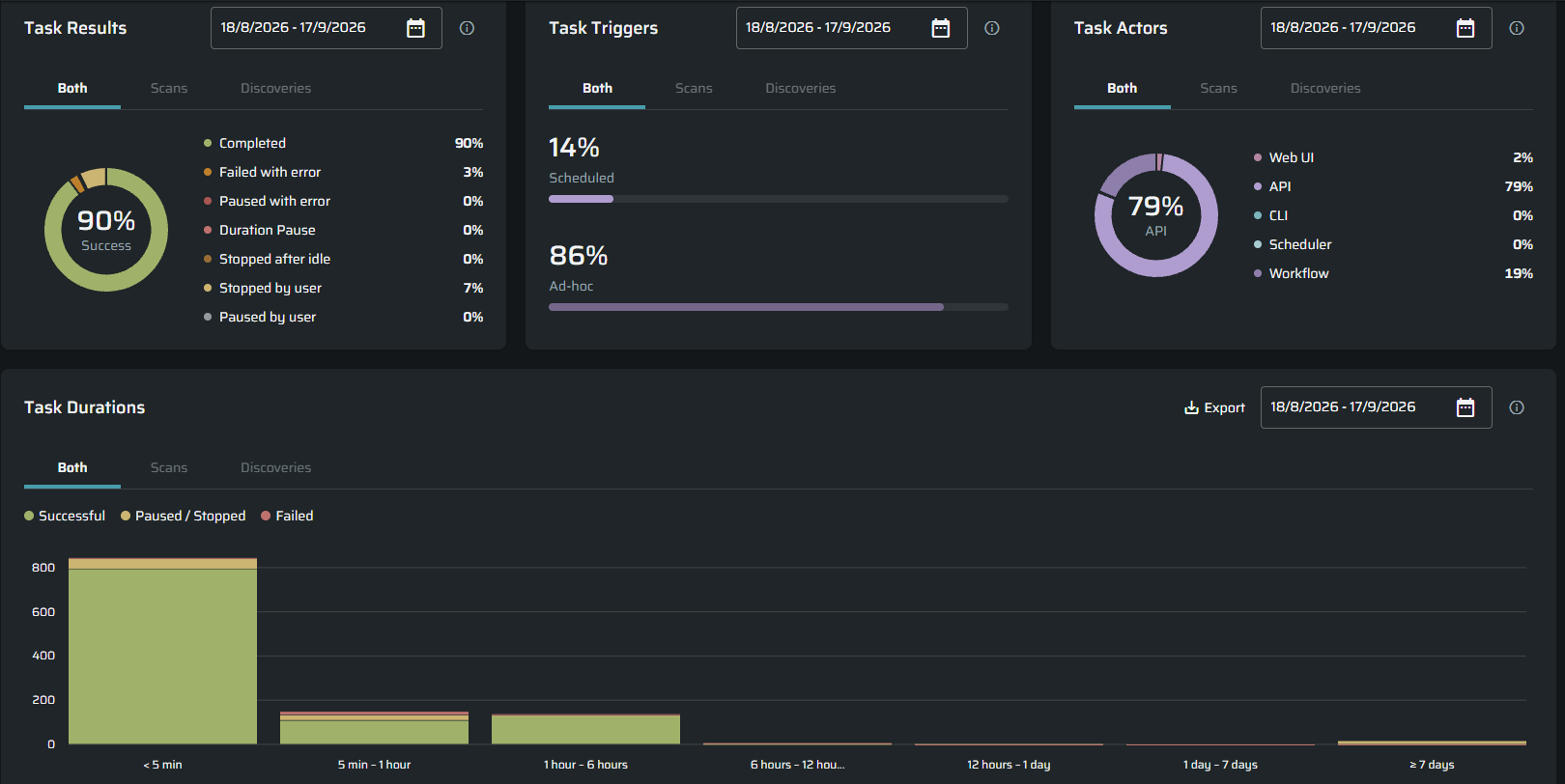
Added four new widgets to the Task Overview section of the Organization and Project dashboards:
- Task Results: Shows how Scans and Discoveries ended, including completed, failed, paused, and stopped tasks. This helps users quickly identify execution failures and unusual outcomes.
- Task Triggers: Shows whether tasks were started by a schedule or manually. This helps teams understand how much of their security testing is automated.
- Task Actors: Shows where tasks were started, such as the Web UI or API. This provides better visibility into how different tools and integrations are being used.
- Task Durations: Groups completed, paused, and stopped tasks by execution time. This makes unusually short, long-running, or interrupted tasks easier to identify.
The widgets support project, task type, and date-range filters, allowing users to analyze the activity that is most relevant to them.
Note: Historical data collection will begin on September 22. The widgets may initially show limited data and will become more informative as data accumulates over time.
Support for Scanning More Than 2,000 Entry Points
Workflows can now scan applications containing more than 2,000 Entry Points.
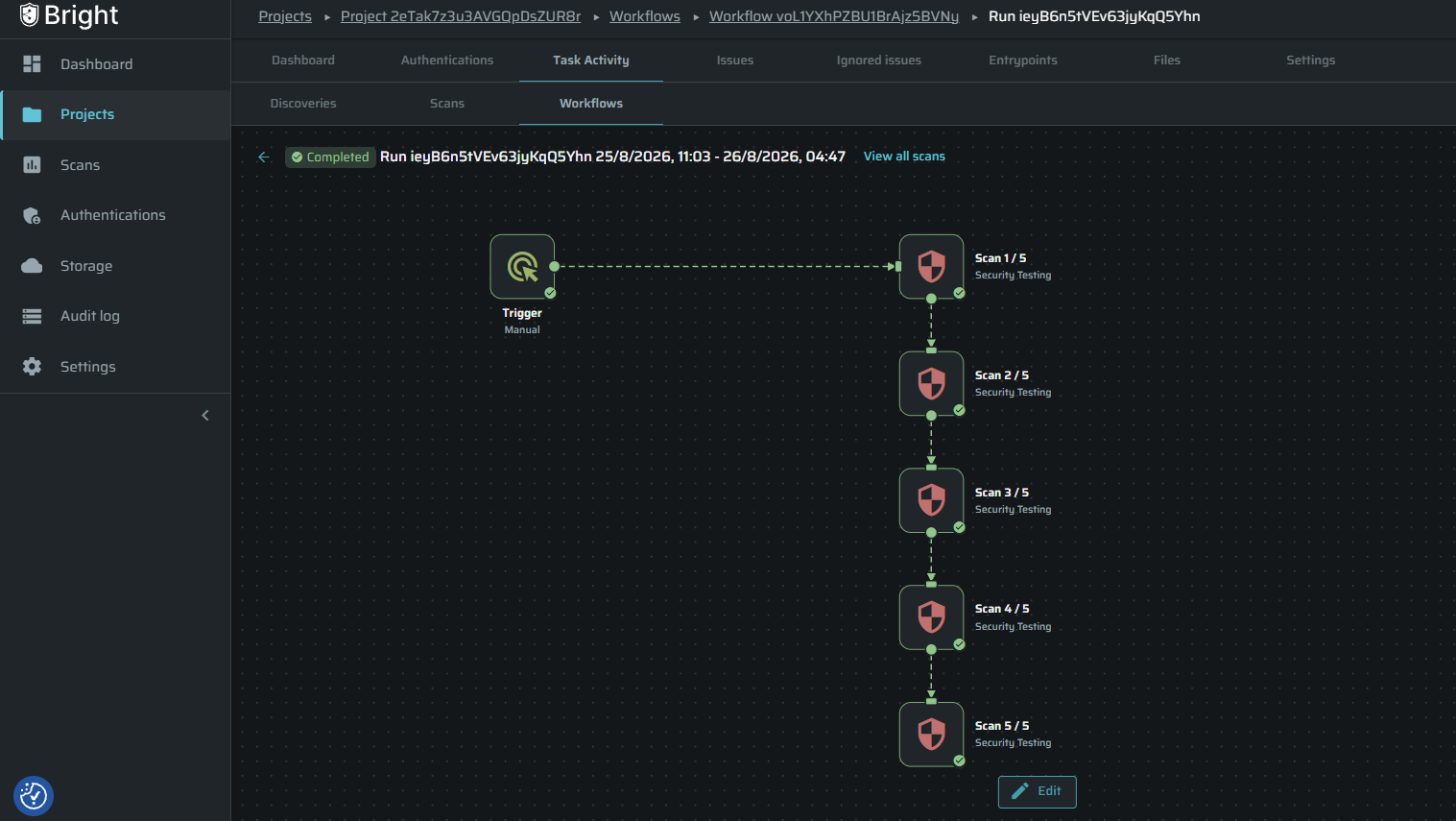
Bright automatically divides the discovered Entry Points into batches of up to 2,000 and runs them sequentially within a single Workflow Run. Users do not need to divide large applications or create separate Scans manually.
Each batch is displayed as a separate Scan node, allowing users to monitor its status and identify failed or interrupted batches. If one batch fails, the remaining batches can continue running, and users can open the Scans page filtered by the relevant Workflow Run for further investigation.
This removes the 2,000 Entry Point limit for Workflow-based testing and makes large applications easier to scan, monitor, and troubleshoot. The limit remains unchanged for standalone Scans.
Improved Workflow Run Visibility
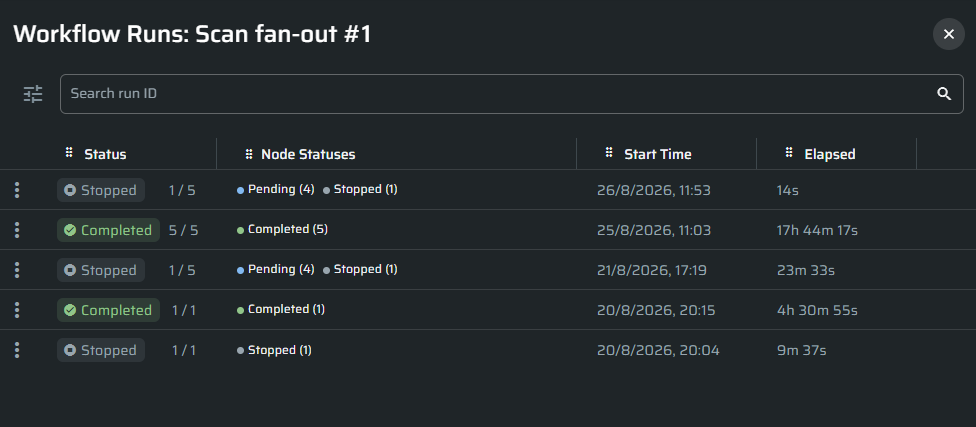
Improved Workflow Run details to provide a clearer view of the progress and health of each run.
The updated view includes:
- Execution progress displayed as executed nodes out of total nodes.
- A breakdown of completed, running, paused, skipped, failed, and stopped nodes.
- A warning indicator when a run contains problematic nodes, even if the overall Workflow is still running or completed.
- A View Scans action that opens the Scans page and automatically filters it by the selected Workflow Run.
- Configurable table columns, with Run ID and End Time hidden by default to keep the view focused.
These improvements apply to both Scan and Discovery nodes. They help users understand how far a Workflow has progressed, whether any part of it requires attention, and which Scans need further investigation.
Improved Advanced Authentication Editor
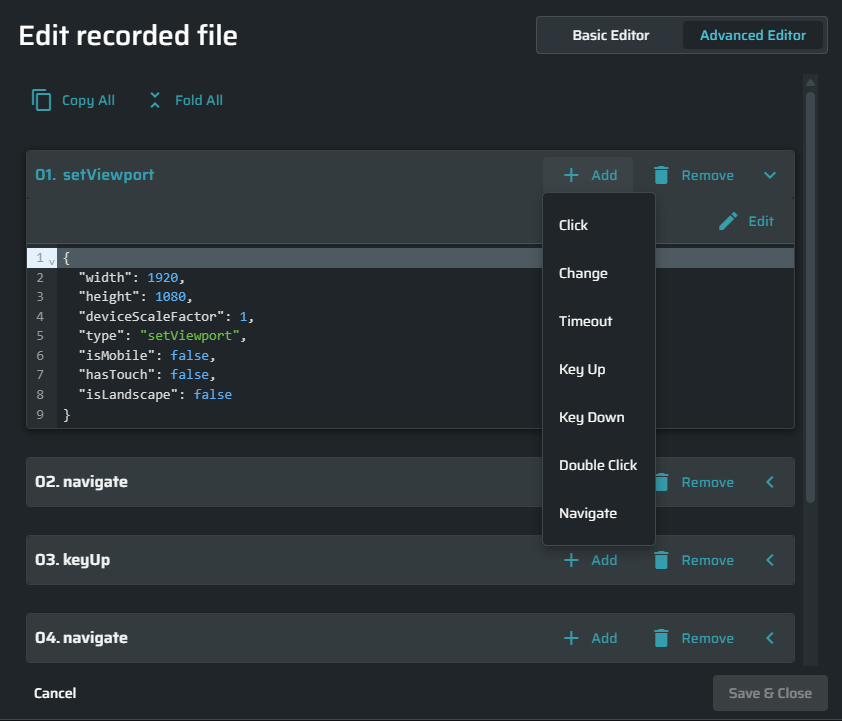
Replaced the single raw JSON block with a step-based editor for authentication flows.
Each authentication step is now displayed separately, allowing users to:
- View and edit individual steps without changing the entire authentication flow.
- Add, copy, delete, and reorder steps.
- Validate JSON changes before saving them.
- Mask, unmask, show, or hide sensitive values.
- Revert unsaved changes.
Users without the required edit permission can still review the authentication flow in read-only mode.
This makes complex authentication flows easier and safer to manage, while reducing syntax errors, accidental changes, and the risk of losing values when editing the JSON.
Easier CVE Filtering
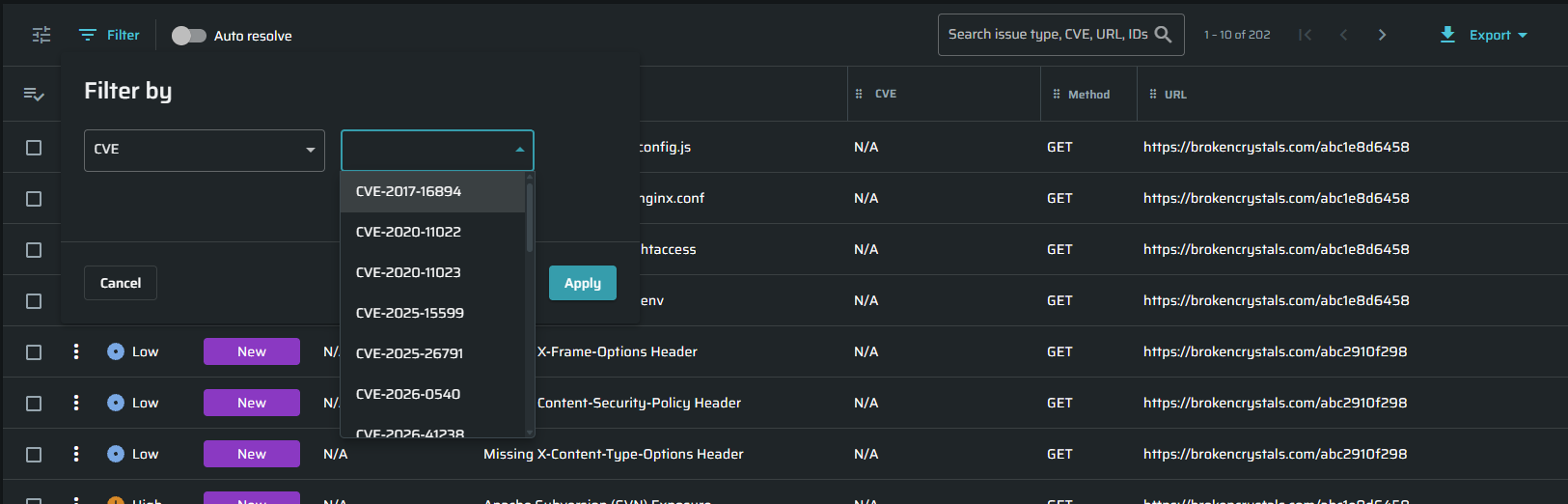
The CVE filter in the Issues tables is now a dropdown, allowing users to quickly select from the CVEs detected in the current project instead of entering them manually
Security Tests
Added three new security tests:
- Email Spoofing: Checks a domain's public DNS records for missing or weak DMARC, SPF, DKIM, and BIMI configuration, reporting the risk of attackers sending mail that impersonates the domain.
- Source Map Exposure: Detects publicly accessible JavaScript source maps (
.js.map), which expose original source code and internal application structure. - MCP Tool Inventory Disclosure: Detects when an LLM-powered entry point can be made to reveal the list of MCP tools available to it.
Improved existing tests:
- Security Headers: X-Frame-Options, HSTS, and X-Content-Type-Options are no longer reported on static JS, CSS, and image resources, where these protections do not apply. Findings continue to be raised on the host's pages.
- Cookie Security: Secure and HttpOnly checks now skip known infrastructure and load balancer cookies, keeping results focused on cookies that carry session state.
- ID Enumeration: Now covers list endpoints that return a JSON array at the root, detecting broken object level authorization that was previously missed.
- Full Path Disclosure: Extended to recognize hosted CI/CD build roots, including Azure DevOps, GitHub Actions, and Travis.
- MCP Session Management: Session ID checks are now protocol aware and skipped for MCP versions where sessions are stateless by design.
- Excessive Data Exposure: Faster and more stable on large, data-heavy pages.
- Prompt Injection: Payload generation now respects the target's payload length limits.
Refreshed Scan Templates
Updated the set of built-in Scan templates so that the available options reflect current testing needs.
New templates:
- Web Application and Web Application (without database)
- API Scan (without database)
- OWASP Top 10 for Web Apps (2025)
- LLM & GenAI Applications
The variants without database testing exclude the tests that write to or manipulate stored data, making them suitable for environments where changes to application data are not acceptable.
Two templates were renamed to better describe how they are meant to be used: Light Scan is now CI/CD Light Scan, and Passive Scan is now Passive Scan (production safe).
The OWASP Top 10 (2017), OWASP Top 10 for Web Apps (2021), MITRE Top 25 (2019), and MITRE Top 25 (2020) templates are now deprecated and no longer offered when configuring new Scans. Existing Scans, recurring Scans, and Workflows that reference them continue to run unchanged.
All active templates were also refreshed to include the security tests added in recent releases.
Template changes apply to new Scans. Any Scan started from a template, through the UI or the API, runs the template's updated test list. Scans that were already scheduled continue to run the test list they were configured with, so existing recurring Scans are not affected by the refresh and their results stay comparable over time.
STAR Harness: Fuzzing Mode
Added a new run mode to STAR Harness that complements DAST by hunting robustness and memory-safety bugs in code that sits past input validation, where HTTP-level testing cannot reach: crashes, hangs, type confusion, unhandled exceptions, unbounded allocation, and algorithmic complexity blow-ups.
Fuzzing mode is self-contained. It does not start the full application, and it requires no scan, authentication, or Repeater, so it can run on a repository on its own.
How a run works:
- Target selection: The agent identifies the security-critical functions reachable from untrusted input.
- Harness generation: For each function it generates a standalone harness that calls the real code path, built with sanitizers where the language supports them. Each harness is verified before it is trusted: it must not fault on its own seed input, and it must report coverage proving it actually reached the target function rather than a stubbed-out stand-in.
- Fuzzing: The evolutionary fuzzer drives the harness inside a per-target container, with the budget sized from the function's complexity.
- Triage: Faults are assessed for reachability from untrusted input and real impact, so the results carry genuine risks with a calibrated severity and rationale rather than every benign panic.
- Fix and validate: The agent generates a source fix, rebuilds, and replays the exact crashing input. A fix is committed to the pull request only when the crash is gone and the original seed still passes. Findings are reported either way.
Each finding points at the file and function holding the bug and includes the reproducing input as evidence, delivered in the same pull request and summary as any other STAR Harness run.
The approach is language agnostic. The harness is generated in whatever language the target function is written in, so the mode is not restricted to a fixed list of stacks. C, C++, Go, Rust, Java, Kotlin, Scala, Python, C#, JavaScript, TypeScript, and Crystal additionally carry tuned build, sanitizer, and coverage recipes, which makes harness generation faster and more reliable on those stacks.
The mode requires Docker and a Linux x64 host. The fuzzing budget, per-input timeout, and per-input memory cap are configurable.
Deprecation Notice
entrypointsStatuses in Scan Configuration
entrypointsStatuses in Scan ConfigurationAs of 22 September 2026, the entrypointsStatuses property in the Scan Configuration API is deprecated.
To select entry points for a scan, use the entryPointFilter property instead. This provides more flexible filtering based on both Security Status and Connectivity Status.
"entryPointFilter": {
  "securityStatus": [
    "new"
  ],
  "connectivityStatus": [
    "ok"
  ]
}
The existing entrypointsStatuses property remains supported during the deprecation period to allow customers time to migrate their integrations.
We recommend updating API integrations to use entryPointFilter for all new implementations.
GitHub Organization Rename
The Bright GitHub organization will be renamed from Neuralegion to BrightSec on October 20.
As part of this change, GitHub Marketplace Actions and publicly available npm packages will be updated to use the new BrightSec organization name.
If your integrations or workflows reference the Neuralegion GitHub organization directly, you may need to update them to use BrightSec.
Additional migration details will be provided where customer action is required.